
Custom web experiences powered by your Notion workspace.
Turn your Notion databases into beautifully branded forms, assessments, intake experiences and interactive tools that live on your own website.
Your visitor sees your brand. Your team gets structured data.
The Business Friction Snapshot is a real example built for Productive IT Partners. Visitors interact with a custom experience on our website while their responses are securely organized inside our private Notion workspace.
Try the live website experience.
The Snapshot was designed to look and feel like part of the Productive IT Partners website — not like a generic third-party form. Complete it yourself to see the visitor-facing experience.
Open the Live Snapshot →Business Friction Snapshot
Eight structured questions, two written reflections, optional contact information and a custom completion experience — all presented directly on our own website.
Behind the experience, the responses become useful records.
Instead of receiving an isolated form submission, the information arrives inside a structured Notion database where it can become part of the way your team works.
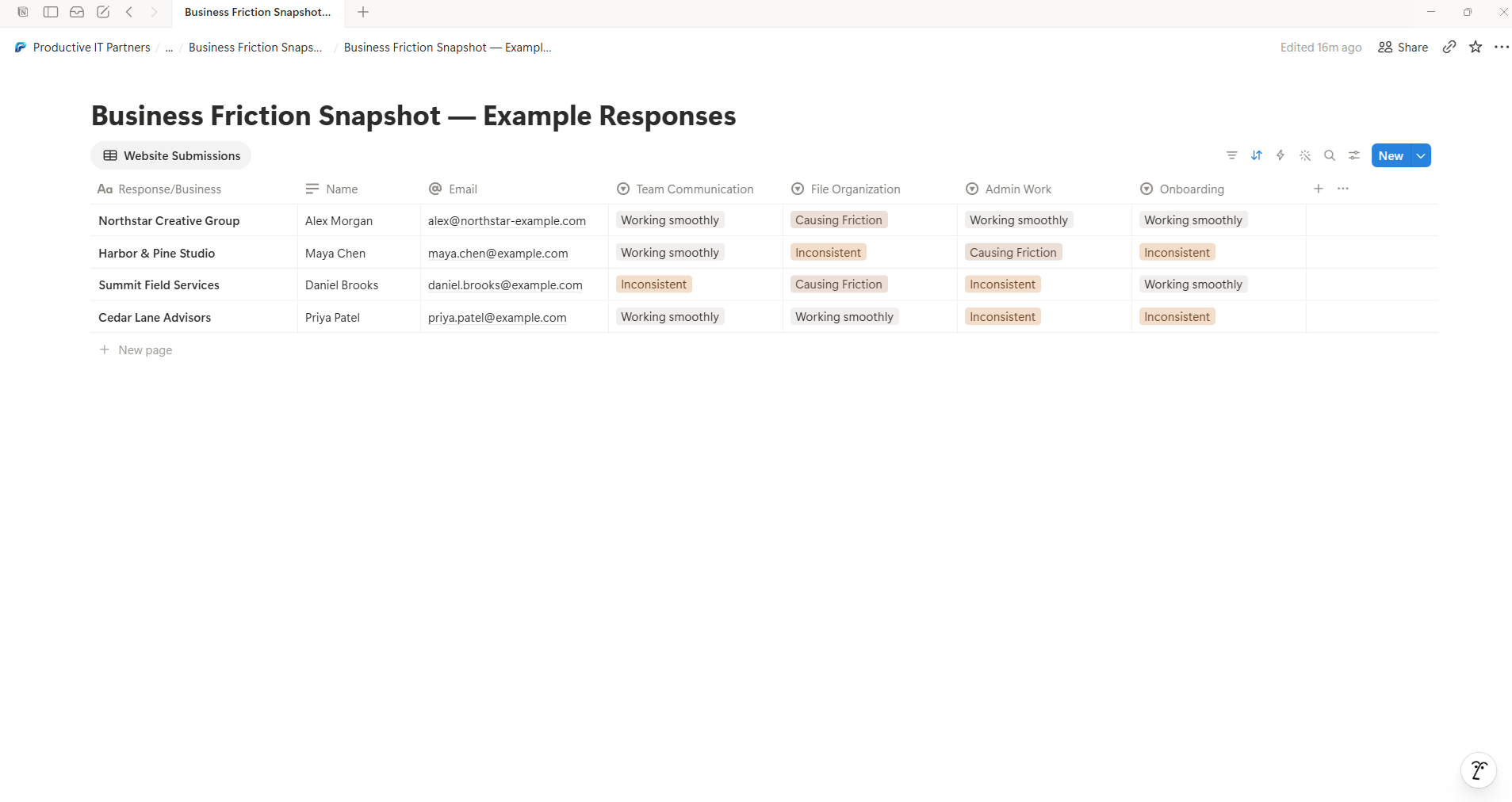
Each website response becomes a structured database record with the information already separated into useful properties.
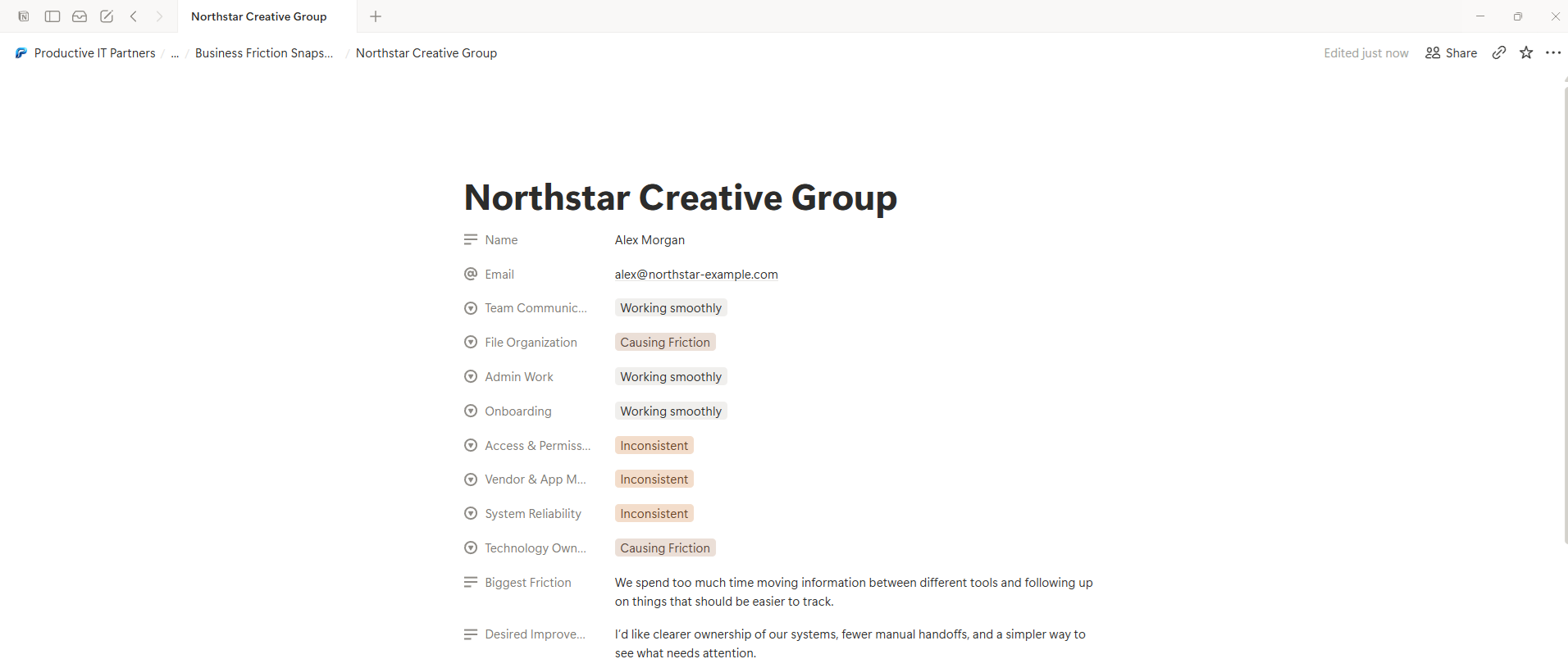
Structured choices and written responses stay together, giving the team a complete record they can review and act on.
What could you build?
Forms are only the beginning. A custom website experience can collect, organize, calculate, qualify or present information while Notion remains the workspace behind it.
Client Intake
Give new clients a polished onboarding or intake experience while their information is organized into structured records for your team.
CollectAssessments & Questionnaires
Create guided assessments with structured choices, written reflections, scoring logic and a custom completion experience.
EvaluateApplications & Registrations
Collect applications, registrations, requests or other structured submissions directly into the workspace where your team reviews them.
OrganizeQuote & Service Requests
Ask the right questions before your team follows up so requests arrive with useful context instead of a vague message in an inbox.
QualifyCalculators & Interactive Tools
Let visitors enter information, receive a useful result, and when appropriate save the underlying information for your team to work with later.
CalculateDirectories & Resource Experiences
Present structured Notion content through a cleaner, purpose-built website experience instead of exposing the underlying workspace itself.
PresentThe goal isn’t to force every idea into Notion. It’s to build the simplest useful experience around the way you already work.
A defined build, not an open-ended technology project.
We start with the job the experience needs to do, build the customer-facing interface, connect it to your Notion workspace and make sure the finished system works as intended.
The pieces needed to make it work.
Three clear stages.
We clarify what visitors should do, what information needs to move, and how the result should appear inside Notion.
The website interface and secure connection are built around the agreed workflow and database structure.
We test the visitor experience and the resulting Notion records, correct issues, and leave you with a working implementation.
More advanced requirements — such as complex calculations, multiple databases, external systems, authentication, file handling or larger workflow automation — may require a custom scope. We’ll identify that before the work begins.
Let’s build the first version together.
I’m opening the first five projects at a founding-client price while this Productive IT Partners service is being introduced and refined through real use.
One custom Notion-connected web experience.
Best for a focused form, assessment, intake experience, application, questionnaire or similar interactive experience with a clearly defined purpose.
Complex calculations, multiple databases, authentication, file uploads, external platforms, larger automation workflows, broader Notion workspace design or substantial custom logic can still be explored, but they require a separate scope.
A few things you may be wondering.
The first version of this service is intentionally focused. Here’s what to expect before deciding whether your idea fits.
Do I need to already use Notion?
Not necessarily. If you already use Notion, great. If you do not, you may still be a fit when there is a clear reason for Notion to become the workspace behind the experience. We’ll confirm that during the free fit conversation rather than forcing Notion into a workflow where it does not belong.
Will visitors see Notion?
No. Visitors interact with the custom experience on your website. Notion stays behind the scenes as the workspace where the structured information is stored, reviewed and managed.
What kind of website can this work with?
The website needs to support custom code or another compatible deployment method. We’ll confirm compatibility before the project begins. When the connected Notion database is straightforward, creating or adjusting that database can be included in the defined build. Broader Notion workspace architecture is separate.
Does the experience have to look like a standard form?
No. The interface can be designed around the purpose of the experience. That may include styled choices, multiple sections, custom instructions, calculated results, completion states or other interface elements that make sense for the defined project.
Is my Notion integration token exposed on the website?
No. The public-facing code does not need to expose the private Notion credential to visitors. The connection is handled server-side so sensitive integration credentials stay out of the browser.
Will I need another monthly form-builder subscription?
Not necessarily. A defined build can often use your existing website, your Notion workspace and lightweight supporting infrastructure instead of requiring a separate form-builder subscription. Any required third-party costs will be identified before the project begins.
Who owns the setup, and is ongoing maintenance included?
Where practical, the finished setup is built around accounts you control, including your website, Notion workspace and supporting infrastructure. The one-time project fee does not automatically include ongoing maintenance. If the delivered build does not perform the agreed function at handoff, that is a correction. New requests, expanded functionality or later third-party platform changes are separate work.
How long does a defined build take?
Most defined builds are targeted for completion within 5–10 business days after the scope is confirmed and the required content, access and decisions are available. More complex ideas may require a separate timeline.
What does one refinement round mean?
After the first working version, you can provide one consolidated round of reasonable adjustments to the agreed experience. Correcting something that does not perform the agreed function is not counted as a refinement. New functionality, changed requirements, additional integrations or expanded workflow logic may require additional scope.
What if my idea is more complicated than the founding offer?
That is fine. We can first determine whether the idea fits the defined founding build. Projects involving complex calculations, multiple databases, authentication, file handling, external platforms or larger automation workflows may need a separate scope and price.
Is this an official Notion product or partnership?
No. This is an independent Productive IT Partners service that builds custom experiences which can connect with a client’s Notion workspace. Productive IT Partners is not representing this service as an official Notion product or partnership.
Have an idea for something your website should do with Notion?
Bring the idea to a free 20-minute fit conversation. We’ll determine whether it fits the founding build, clarify the intended result and confirm the next step before any paid work begins.